0
Table of Contents
B2B SaaS Website Performance & Accessibility Benchmark 2026
All 60 SaaS homepages received lab and accessibility checks. Among the 37 with complete paired field records, six passed Core Web Vitals on mobile and 26 on desktop.
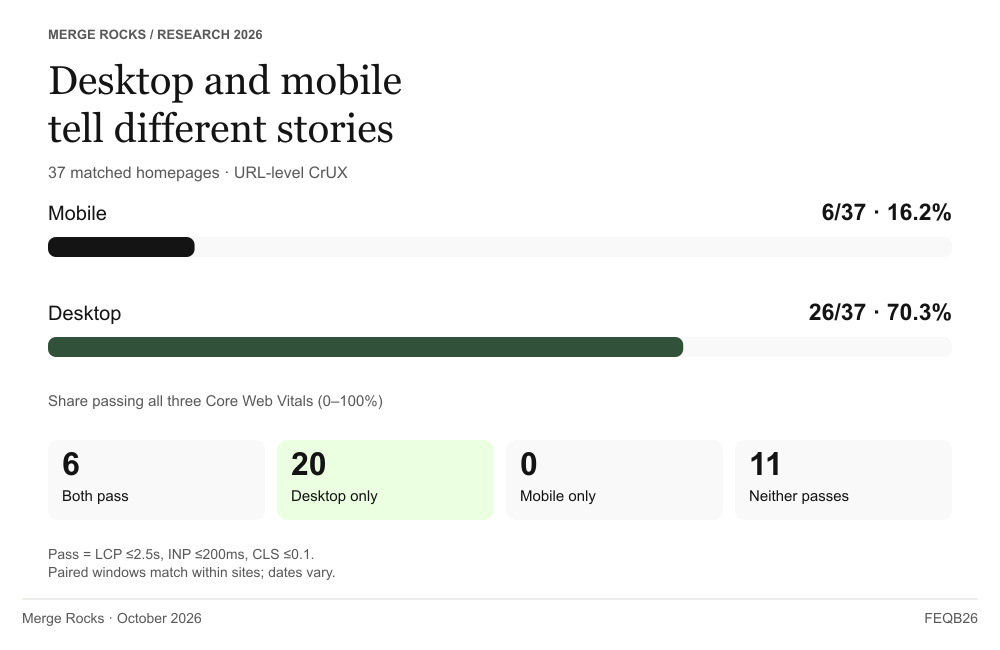
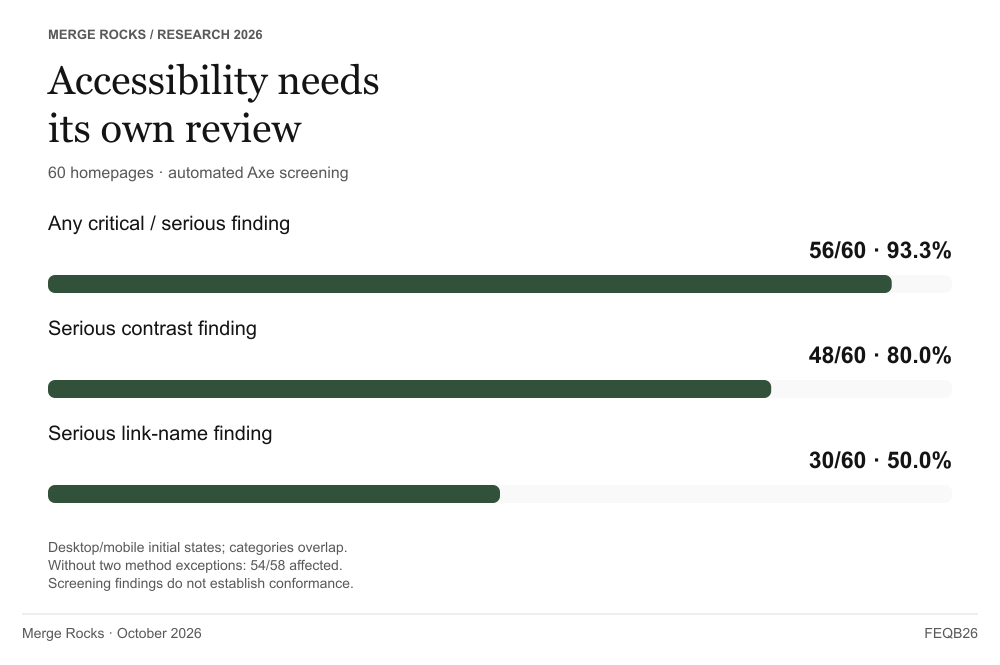
Only 6 of 37 SaaS homepages (16.2%) with complete, matched Core Web Vitals field records passed all three metrics on mobile, compared with 26 of 37 (70.3%) on desktop. Across our full October 2026 selection of 60 B2B SaaS marketing homepages, automated accessibility checks flagged critical or serious findings on 56 of 60 sites (93.3%). Those are initial-state screening results, not a determination of accessibility conformance.
The desktop result is the part I would pay attention to first. Twenty homepages passed on desktop and missed at least one mobile threshold. A team could present a correct desktop report and still leave an important part of the page's behavior unexamined. Even a good performance result could sit alongside accessibility findings that needed separate review.
We built this benchmark to make that gap visible. We examined the same public entry pages through URL-level Chrome UX Report (CrUX) data, five mobile Lighthouse runs per site, and automated Axe checks in desktop and mobile states. We selected companies in Apollo's 51–200 employee band across three SaaS segments. The study concerns their marketing pages; it does not assess their authenticated products.
Before signing off a release, decide what the report has actually checked on the page. If a question remains open, name the next check and who will own it. That is how I use these findings. The company list, test conditions, and downloadable data let you trace each conclusion back to the measurements.
We tested 60 websites. Why do some results use 52 or 37?
Every one of the 60 homepages has our five Lighthouse speed tests and two automated accessibility checks. The smaller numbers belong to two specific comparisons:
- 52 sites: our main comparison of lab speed results. The other eight also have results, but collection produced technical warnings or required a different browser method. We show those eight separately.
- 37 sites: the mobile-versus-desktop comparison using Google's records of real visitors. Only these sites had all three field metrics for both devices over matching periods. The other 23 lacked at least one required measurement.
These are two groups drawn from the same 60 sites. We did not progressively reduce the study from 60 to 52 to 37. The separate results and missing values remain visible in the downloads.
1. Twenty homepages passed Core Web Vitals on desktop alone
Among 37 homepages with complete, matched mobile and desktop CrUX records, six passed all three Core Web Vitals on both devices. Another 20 passed on desktop alone. None passed only on mobile, and 11 passed on neither.
|
Paired Core Web Vitals result |
Homepages |
|
Both desktop and mobile pass |
6 |
|
Desktop passes; mobile does not |
20 |
|
Mobile passes; desktop does not |
0 |
|
Neither passes |
11 |
For a release decision, “passing Core Web Vitals” needs a device attached to it. A desktop report can be correct while leaving the mobile experience unresolved. The two records describe different visitor experiences on the same page; neither should stand in for the other.
We used Google's “good” thresholds: LCP no longer than 2.5 seconds, INP no longer than 200 milliseconds, and CLS no higher than 0.1. These cover loading, responsiveness, and layout stability. Each field record reports the 75th percentile, or p75: about 75% of the recorded experiences had that value or a better one. A page passes for a device only when all three reported values meet their thresholds. Google's Core Web Vitals definitions.
INP accounts for the largest gap in individual pass counts
Breaking the same 37 pairs into their individual metrics makes the overall result easier to investigate.
|
Metric meeting its recommended threshold |
Mobile |
Desktop |
|
LCP: loading |
18/37 |
30/37 |
|
INP: interaction responsiveness |
17/37 |
36/37 |
|
CLS: visual stability |
30/37 |
31/37 |
The largest difference is in INP. Almost the entire paired group meets the desktop INP threshold; fewer than half meet it on mobile. CLS has a much smaller difference in pass counts. That distinction would disappear inside a single all-three pass percentage.
To compare the 37 sites, we took the middle value of their individual INP p75 records: 208 ms on mobile and 85 ms on desktop. Each site counts once. We did not pool all visitors into one dataset, so these are comparisons between sites, rather than a new percentile for their combined audience.
The mobile INP gap tells me where to start asking questions. It does not identify the cause. The same page can miss more than one threshold, and the visitors and devices behind the two records can differ. This is an exploratory breakdown of the same records, calculated after collection; it was not a separate experiment.
For the other 23 sites, at least one measurement needed for this comparison was missing. We leave them out of the paired pass/fail comparison. Their Lighthouse and Axe results still belong to the study. The 37-site rate describes only the pages with complete paired records.
2. Performance passes still left accessibility findings to review
Axe flagged at least one critical or serious finding on 56 of the 60 homepages, combining each site's initial desktop and mobile states. Serious color-contrast findings appeared on 48 sites; serious link-name findings on 30.
|
Automated finding |
Sites |
Share of 60 |
|
At least one critical or serious finding |
56 |
93.3% |
|
Serious color-contrast finding |
48 |
80.0% |
|
Serious link-name finding |
30 |
50.0% |
Contrast asks whether text stands out clearly from its background. Link names ask whether a person can identify what a link does, including when a screen reader announces it. A visually clear page can still have an unnamed link. The findings point to different checks, so combining both into one “design quality” score would hide useful information.
Axe uses labels such as critical and serious to help reviewers set priorities. Those labels do not replace checking the affected element in context. A page with no automated findings may still be difficult to use. The W3C's evaluation guidance explains why human evaluation is needed alongside automated checks.
The same companies can have good field performance and accessibility findings
We checked whether pages with good field performance also had accessibility findings. For each site, we compared its paired CrUX results with the Axe findings from either initial viewport. Of the 26 homepages passing all three desktop Core Web Vitals, 24 had at least one critical or serious Axe finding. Of the six passing on mobile, five had such a finding.
|
Field-performance subgroup |
Sites |
Also have a critical/serious Axe finding |
|
Desktop passes all three Core Web Vitals |
26 |
24 |
|
Mobile passes all three Core Web Vitals |
6 |
5 |
A desktop Core Web Vitals pass leaves the accessibility result open. The same site can have an Axe finding only in its mobile view. We are comparing the same sites across different observations: CrUX covers a rolling period, while Axe captures a page at a particular time. Recorded URL paths and page states can also differ. A site can appear in both rows, so adding them would count some sites twice. This is an exploratory comparison of existing records.
Even with those boundaries, the practical point is clear: these sites' reassuring performance records did not remove the need to inspect their accessibility reports. An approval process should retain the accessibility result as a separate item with its own owner.
A page with one severe flagged element and a page with many both count once in the 56-of-60 result. That shows how widespread the findings were across sites. It does not measure the difficulty of using each page or provide a ranking of companies.
Coverage matters here. Our automated checks captured initial rendered pages without opening menus, completing forms, or clicking consent controls. They do not describe all the states a visitor can encounter. A homepage with no severe finding in those initial states still needs appropriate keyboard, screen-reader, and task checks before a team makes a broader accessibility claim.
We checked whether the result depended on the collection exceptions. Removing the two browser-method exceptions left 54 of 58 sites with findings. Separately, removing the site with the disclosed accessibility-state caveat left 55 of 59. We did not combine these exclusions. The findings remain widespread in both checks, within this sample.
3. JavaScript transfer tracked lab blocking
Across the primary 52 Lighthouse sites, JavaScript transfer and Total Blocking Time had a Spearman rank correlation of 0.727. Excluding the two sites with the largest JavaScript-transfer values produced 0.722 across the remaining 50.
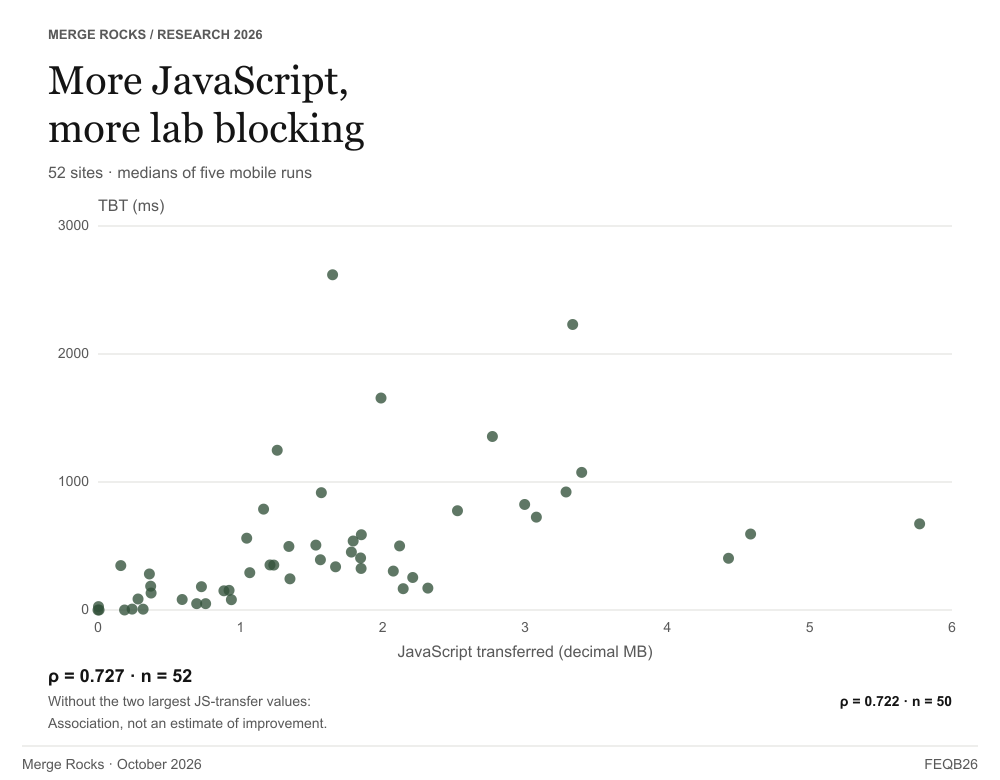
Spearman correlation compares how the sites rank on the two measurements. In this sample, sites transferring more JavaScript tended to have higher TBT. The coefficient describes that shared pattern. It does not tell an engineer how many milliseconds a particular script removal would save.
We also checked whether the two largest JavaScript transfers were carrying the result. After removing those sites, the correlation barely changed. That makes the pattern worth investigating across the sample. It still does not explain why a particular page blocks the browser.
The lowest and highest JavaScript quarters
We sorted the 52 primary sites by JavaScript transfer, then divided them into four equal groups of 13 sites. The table compares the lowest-transfer group with the highest-transfer group.
|
JavaScript-transfer group |
Sites |
Median JS transfer |
Median TBT |
|
Lowest quarter |
13 |
0.281 MB |
49.5 ms |
|
Highest quarter |
13 |
3.080 MB |
725.5 ms |
The gap is large, but the table compares different pages. We did not remove JavaScript and retest the same sites. The groups can also differ in content, integrations, and implementation. Matching the lower group's transfer size would not guarantee its TBT.
TBT is a lab measure of how long the browser's main thread is blocked during the measured load. For each task lasting more than 50 ms, only the time beyond 50 ms counts toward TBT. That helps diagnose delays while the page loads. INP measures responsiveness during real user interactions, so TBT cannot replace the field INP record. Google's TBT explanation.
For an individual page, I would connect what loaded with what the browser spent time doing. A script inventory and a performance trace answer those different questions. We did not measure each script's contribution, so the plot alone cannot tell a team which integration to change.
The finance subgroup is more sensitive to exclusions
In the finance/operations/people group, the correlation was 0.561 across 15 sites. Removing the two sites with that group's largest JavaScript transfers took it to 0.341 across 13 sites.
The result is steadier across the whole primary group than within this smaller subgroup. I would treat that difference as a reason to investigate individual pages. It does not establish one JavaScript budget for every category or tell us what a change would do to conversions.
4. Segment medians hide wide variation between pages
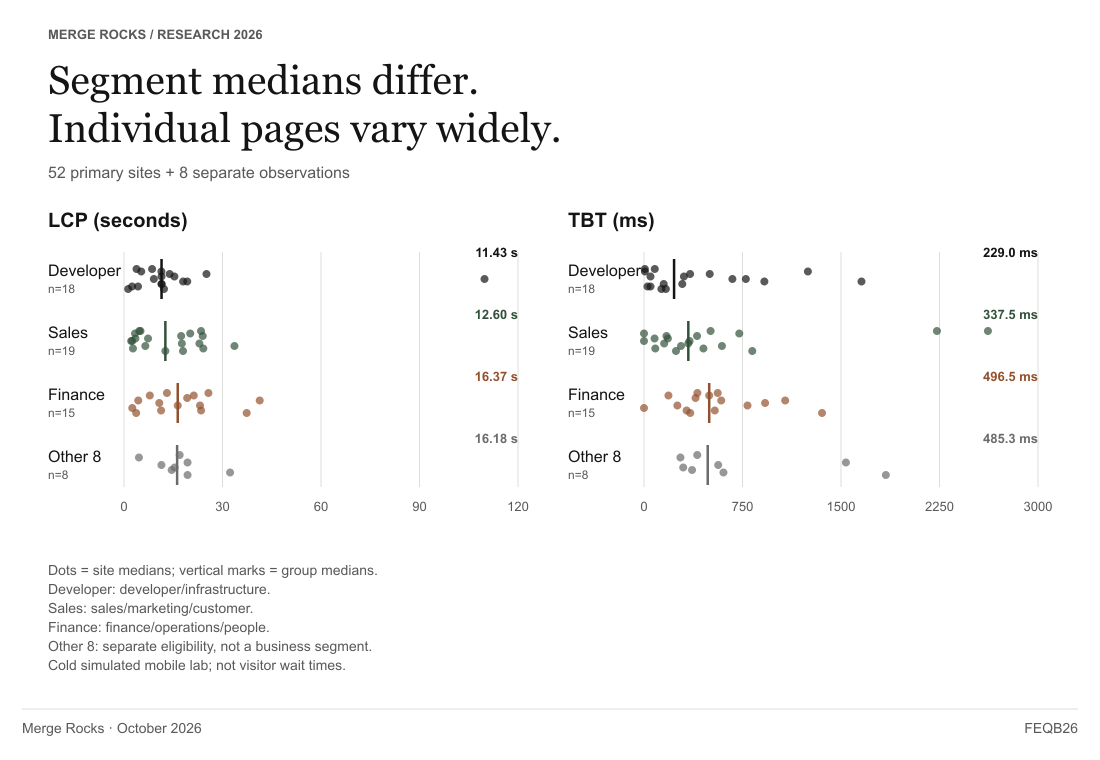
Finance/operations/people had the highest median lab LCP and TBT among our three primary segments. Developer/infrastructure had the lowest. The point distributions matter as much as that ordering.
|
Group |
Sites |
Median lab LCP |
Median lab TBT |
Median JS transfer |
|
Primary developer/infrastructure |
18 |
11.43 s |
229.0 ms |
1.151 MB |
|
Primary sales/marketing/customer |
19 |
12.60 s |
337.5 ms |
1.531 MB |
|
Primary finance/operations/people |
15 |
16.37 s |
496.5 ms |
1.793 MB |
|
Other eight, separate eligibility |
8 |
16.18 s |
485.3 ms |
1.852 MB |
These are cold, simulated mobile test results. A 16.37-second lab LCP does not mean that a typical finance-software visitor waited 16.37 seconds. The field records have their own coverage, time windows, and real-user conditions, so we report them separately.
The median is the middle of the site values, with each site counting once. It leaves out the wide spread around that middle. A page in the fastest segment can still be slow, and a page in the slowest segment can be faster than its peers. The individual dots keep that variation visible, including the largest LCP value.
We started with 20 companies in each segment. The main Lighthouse comparison uses 18, 19, and 15 because the other eight are reported separately for collection reasons. We then repeated the comparison with all 20 in each segment. The LCP and TBT median order stayed the same: developer/infrastructure, sales/marketing/customer, then finance/operations/people. That check supports the ordering, but does not make the other eight equivalent to the main group.
Being faster than the segment median does not establish whether a page is comfortable to use. A CTO can use the comparison to frame a review, then set the performance budget around the page's purpose and users.
The company appendix lets you look past the group median. It lists each company's page, values, and method notes, so you can inspect the observation behind a dot. The names identify the sample; they do not turn these measurements into a vendor ranking. Company size, selection, and measurement conditions still limit the comparison.
From a benchmark result to the next release check
The five scenarios below connect gaps in these results to checks a team can assign. These are recommendations, not interventions we tested or measured for commercial impact. The suggested roles identify who could resolve each question.
Desktop passes, but mobile does not
Start with the same URL's mobile record and identify the metric outside its threshold. A frontend lead or performance engineer can then investigate loading, interaction responsiveness, or visual stability as appropriate. Keep both device records, their field windows, and the relevant diagnostic notes with the ticket. “Improve mobile performance” becomes a defined question the engineer can test.
Mobile field data is missing
Keep the missing measurements visible. Use clearly labeled lab tests to investigate the page, and consider measurements from your own visitors to close the gap. The performance engineer should record what is known, what is missing, and when to check again. Missing CrUX is not an automatic release failure. The release owner still needs to decide whether the remaining uncertainty is acceptable.
JavaScript transfer and lab blocking are both high
Ask the frontend engineer and integration owners to inspect the work behind the blocking. Record why the scripts load, which tasks run, and what specific change is proposed. Compare equivalent repeated measurements after the change. Retain the trace or task evidence alongside the reports so the result can support a diagnosis rather than a general preference for smaller bundles.
Axe flags a critical or serious finding
An accessibility reviewer, designer, and frontend engineer can inspect the affected rule, component, and state together. Review the relevant task manually and verify any correction. Keep the element evidence, test conditions, and outcome attached to the issue. This gives the team a way to distinguish a resolved barrier from a changed report total.
Lighthouse results vary between runs
Check the configuration, warnings, and page state before interpreting the difference as an improvement or regression. The frontend engineer or QA reviewer should retain all runs, the median and spread, and an explanation of any changed conditions. A decision based on the most favorable attempt would conceal the variation that prompted the investigation.
Keep the URL, build, unresolved question, and responsible person together in the release record. If the team accepts a remaining issue, record why and what will be checked next. The person reading that record later should be able to distinguish a deliberate decision from a missed check.
Repeated checks can fit into automated frontend testing, while task-based accessibility review needs its own coverage. The article's companion Frontend Release Readiness Checklist supplies owners, methods, and a copyable release record. It extends into interactions we did not measure here.
This is also a concrete way to define frontend deliverables: include evidence of the agreed behavior alongside the implemented page. Teams seeking help with that implementation can review Merge Rocks' front-end development services.
The 60 companies and the boundaries of the study
We selected 20 companies in each of three segments. Each segment has five product categories with four companies per category. Apollo's 51–200 employee band defined our company-size scope; it was a dated qualification record, not an independent headcount check. We chose this panel deliberately to compare selected categories. It is not a random or representative sample of the SaaS market.
The full selection is grouped below. Each name links to the designated marketing page in our measurement records. Categories describe our sampling choices; some products serve more than one category. Listing a company does not imply participation or endorsement.
Developer and infrastructure software — 20 companies
- Application development: Appfarm, DronaHQ, Softr, ToolJet.
- Cloud management: Appvia, CloudBolt, Kion, North.
- IT management: Addigy, Fleet, Liongard, Patch My PC.
- Observability and monitoring: Mezmo, Netdata, Selector, VictoriaMetrics.
- Managed service providers: Blumira, Domotz, Rewst, Thread.
Sales, marketing and customer software — 20 companies
- CRM: Capsule CRM, EngageBay, Scoro, Vtiger CRM.
- Marketing automation: AWeber, Benchmark Email, CleverReach, Elastic Email.
- Sales enablement: Navattic, Reprise, SalesHood, Trumpet.
- Customer service: Deskpro, Dixa, Level AI, Trengo.
- Help desk: BOSS Solutions, Crisp, eDesk, HappyFox.
Finance, operations and people software — 20 companies
- Accounting: Accounting Seed, AccountsIQ, Gappify, Puzzle.
- Expense report: Circula, N2F, Precoro, Webexpenses.
- Enterprise resource planning: Enmark Systems (Eniteo), ERPLY, Frappe, Ofima.
- Human resources: CharlieHR, HR Cloud, Kenjo, PeopleForce.
- Payroll: Hourly, OnPay, Payboy, Workpay.
We measured one designated public marketing entry page per company. Some use a language or product path rather than the domain root. We did not enter authenticated products or assess their workflows, backend reliability, security or customer outcomes.
Following a company link today may show a different page from the one measured in October. A redesign, redirect, or changed script can alter the result. Use the recorded URL, observation date and method note in the appendix when interpreting a company value; a current visit is not a reproduction of the historical test.
Webexpenses replaced Weel, and Workpay replaced Patriot Software after access problems prevented collection. We kept the original partial records out of the effective 60. These replacements and the earlier access checks may favor pages that could be tested under the protocol. We did not give inaccessible sites a poor performance score.
One original Apollo company record did not include its domain. We recorded that exception, and we did not verify who ultimately owns every company. The company appendix keeps the names, designated URLs, individual metrics, and method notes together, including the qualifications needed to interpret a company value.
Why the main Lighthouse comparison uses 52 sites
Each site has five valid mobile Lighthouse runs. For each metric, we take the middle of those five values, called the median, to summarize that site. A comparison therefore has one value per site. The 300 retained runs still represent only 60 websites. Earlier invalid attempts do not enter the summary, and we did not choose each site's fastest run.
The main comparison contains 52 sites: 15 labeled clean and 37 labeled unstable. The data uses “primary” for this group. We report the other six warning-affected sites and two browser-method exceptions separately.
“Unstable” describes how the runs varied, not whether collection failed. Our check asks whether at least four of the five runs stay close to their median: within 20% for LCP and TBT, and within 0.02 for CLS. The TBT calculation uses a denominator of at least 50 ms, so tiny values are not treated as large percentage changes. An unstable label does not prove a defect experienced by every visitor.
|
Eligibility view |
Sites |
Median lab LCP |
Median lab TBT |
|
Primary |
52 |
11.81 s |
349.0 ms |
|
Clean only |
15 |
12.60 s |
243.5 ms |
|
Warning inclusive |
57 |
12.18 s |
352.0 ms |
|
Variant inclusive |
54 |
12.39 s |
349.0 ms |
|
All five-valid sites |
60 |
12.84 s |
359.0 ms |
Choosing only the sites labeled clean changes the question, as well as the median. That TBT result describes 15 sites, not all 52 in the primary group. I want that choice visible when a team compares its own page with our result. The views overlap: a site can have both a warning and a browser-method flag. They are not five separate samples. The downloads keep each site's runs and flags so readers can inspect the selection behind each number.
Field coverage and collection dates
We requested field records for two device types on each of the 60 URLs: 120 records. Of those, 91 contained all three metrics, seven contained only some, and 22 had insufficient data. Mobile contributed 37 complete, six partial, and 17 insufficient records; desktop had 54, one, and five, respectively. Only 37 sites had the complete, matched pair needed for the headline comparison. Broader origin-level records are not measurements of one specific URL, so we did not use them to fill these gaps.
Lighthouse collection ran from October 6–27, 2026, and Axe from October 7–27. The CrUX records cover rolling 28-day periods: the earliest retained window is September 7–October 4, and the latest is September 28–October 25. We matched the mobile and desktop window within each site. Different sites can have different windows, so this is not a same-day snapshot. The CrUX API documentation explains these records.
The baseline used Lighthouse 13.4.1, Axe 4.13.0, Chrome for Testing 153.0.8010.47, and Node 24.19.0. Lighthouse used cold mobile runs, simulated throttling, a 412 × 823 CSS-pixel viewport, and a four-times CPU slowdown setting. Documented browser and recovery exceptions remain visible in the full methodology.
What this contributes alongside larger benchmarks
The 2025 Web Almanac performance chapter provides broad web context. The 2026 WebAIM Million examines automated accessibility at a much larger homepage scale. Alkali's 2026 B2B speed benchmark provides another B2B performance reference. Their populations and methods differ, so percentages should not be treated as a direct contest.
Our contribution is to bring three kinds of evidence together for a defined SaaS sample: field performance, repeated lab tests, and automated accessibility checks. Readers can compare devices, inspect individual runs, and see how the inclusion rules change a result. That makes the findings useful without treating this panel as a picture of the entire SaaS market.
Frequently asked questions
Can the results tell us which frontend framework to choose?
No. We selected companies by business category, not technology. Their pages differ in content, integrations, and implementation, so this is not a controlled comparison of frameworks. A company name or JavaScript-transfer total cannot tell us what its framework caused. Use these results to understand the pages we measured; choosing a stack needs a different comparison.
Did we test 60 sites, or only 52 or 37?
We tested all 60. Fifty-two enter the main comparison of our lab speed results; the other eight have results but are shown separately because of collection warnings or a different browser method. Thirty-seven have the complete Google field records needed to compare mobile with desktop. The 52 and 37 groups answer different questions within the same 60-site study. A missing Google metric does not erase the tests we performed.
Does missing CrUX data mean a company has few customers?
No. A missing record means we could not get all the required measurements for that URL, device, and period. It does not explain why they were missing. We did not measure popularity, customer count, or revenue, so CrUX availability cannot stand in for company size.
What if Lighthouse and CrUX seem to disagree?
Start with the URL, device, and dates. CrUX describes real visits over a rolling period; our Lighthouse records are cold mobile lab tests under a recorded configuration. A different release or device can change the result. Use lab tests to investigate a specific behavior, then check suitable field records. The tools measure different conditions, so their numbers need not match.
Can a page pass Core Web Vitals and still have accessibility problems?
Yes. Core Web Vitals describe loading, responsiveness, and visual stability. They do not establish whether controls have useful accessible names or whether someone can complete a task with a keyboard. Our performance/accessibility comparison illustrates why the assessments must remain distinct; the same-site overlap is descriptive, with different dates and viewport states.
Why use five runs and a median instead of the best score?
The best run shows only the most favorable attempt. We kept five valid mobile runs per site and used the middle value for each metric. That reduces the effect of one unusually high or low result. It does not erase warnings or differences between runs, which remain visible with the individual values and diagnostic flags.
How can we compare our site with these results?
Use the same metric, page scope, device conditions, and measurement method. One Lighthouse run today is not equivalent to our median of five October runs, and today's CrUX window is a different period. Treat the benchmark as context, record the differences, and avoid using a peer median as a release target. To test a change on your own site, compare it under equivalent before-and-after conditions.
Does this study rank vendors or estimate lost revenue?
No. We measured selected public marketing pages, not authenticated SaaS products, customer satisfaction, or commercial outcomes. Company names make the panel inspectable. They do not imply endorsement or participation. The data cannot establish a conversion loss, search-ranking effect, or financial return from fixing a finding.
Where can someone verify or cite a result?
Use the company appendix, CSV definitions and downloads, figure notes and methodology. The reproduction script in the data package reconstructs counts, medians, and correlations from the curated tables without visiting the measured sites. Cite the instrument, selected population, and denominator with the number. See the citation and reuse notes for edition information and reuse terms.
We calculated the metric-by-metric device comparison and the CWV/Axe overlap from existing records while preparing this article. These were follow-up analyses, not independent hypothesis tests planned before collection. The downloads preserve missing values and method labels while leaving out raw browser captures and private execution information.
My conclusion: Performance is a growth decision
I work on search visibility, content, and acquisition to bring people to a page. Once they arrive, we are asking for their attention. A slow-loading page, a menu that does not respond, or a button that moves under a tap gives them a reason to spend that attention elsewhere.
On an earlier project, the founder and I debated whether performance optimization deserved the development time. I led a test of two versions of one landing page. I handled the hypothesis, experiment setup, and analysis; our developers made the technical changes.
The versions looked and functioned the same. In the optimized version, the developers moved a widget’s rendering to the server, server-rendered critical HTML and improved image loading. In the A/B test, the performance-optimized page generated 6% more sales than the baseline, with LCP improving by 26%. We decided to extend the work across the site, starting with the pages attracting the most traffic and those already generating sales, then moving to the rest.
That earlier experience shapes how I read the field results in our 60-site benchmark. Among the 37 homepages with complete, matched mobile and desktop field records, 20 passed all three Core Web Vitals on desktop but not on mobile. A desktop pass would still leave me with an unanswered question about visitors arriving on their phones.
For a growth team, that is a reason to put performance into the same conversation as acquisition. Begin with the pages people already visit and buy from. Use the benchmark to identify questions worth investigating, then measure what changes for your own visitors and business. Before I ask a team to bring in more traffic, I want us to understand what happens to the people already arriving.