0
Table of Contents
What is React.js in 2025 and why React 19 changed front-end again
We believe that understanding what is React.js at this high level helps you make better decisions.

What is React.js? In 2025, React.js is a comprehensive JavaScript library and framework architecture used to build user interfaces, specifically designed to render complex, interactive UI components efficiently on both the client and the server. While it began as a tool for building views, it has evolved into a full-stack ecosystem that smoothly handles data fetching, server-side logic, and state management.
If you are a business owner or product manager, you likely hear about React constantly. You might even ask, does React use JavaScript? Yes, it does.
But the way it uses JavaScript has fundamentally shifted with the release of React 19. You are no longer just clicking buttons. The data now moves from your server to your user’s screen with the least amount of friction possible.
At Merge, we have watched this technology evolve for years by working with it directly. We have seen it go from an experimental library to the industry standard for everything from high-frequency trading dashboards to complex Edtech platforms.
What is React js in 2025 – short answer for founders
If you need a quick React overview for a board meeting or vendor comparison, here’s what React.js is in 2025:
- React js library is a JavaScript UI library maintained by Meta and the open source community that lets teams build reusable components instead of hand-coded pages.
- In React 19, that same Reactjs library comes with first-class async workflows, server components, and metadata management, so teams spend less time gluing libraries together and more time on product work.
- The React team also ships React Compiler, currently in beta, which automatically optimizes many components that used to require manual memoization.
If someone on your team asks, “Does React use JavaScript or TypeScript?”, the answer is: it runs on JavaScript at runtime, and many teams add TypeScript on top for type safety.
For a more high-level business context on frameworks around React, you can point people to Merge’s guides on what is a front-end framework and what is the best front end framework in 2025.
Why React 19 changed front-end again
React has not only added features – React 19 reshaped front-end architecture choices. For business owners, these are the four shifts that change how your product is built and maintained.
1. From “manual async spaghetti” to Actions and useActionState
Before React 19, any non-trivial form – onboarding, KYC, payment edits – usually involved:
- Several useState hooks just for pending and error flags.
- Custom code for optimistic updates.
- Extra form libraries layered on top.
React 19 introduces Actions, useActionState, useOptimistic, and useFormStatus to standardize this.
For example, a fintech onboarding form can now:
- Use a single Action that performs the mutation.
- Get pending and error state directly from useActionState, without extra boilerplate.
- Reset the form automatically on success through <form action={actionFn}>.
Founders see the impact as:
- Less custom code around forms, which often produce the most serious bugs.
- Faster iteration on flows like pricing changes, limits, and verification steps.
- Clearer audit and logging, because the async logic is centralized.
Merge often pairs these patterns with Storybook-driven UI work – when we build a reusable component library for a SaaS or fintech client, we document every Action-driven form state in Storybook stories, which is where our React Storybook development service becomes helpful for larger teams.
2. React Server Components and Server Actions as a stable base
React Server Components were experimental for a long time. With React 19, they are now stable for application code, and the ecosystem is rapidly catching up.
What this means in practice:
- Heavy logic and data fetching can move to the server, so the browser downloads less JavaScript.
- Components can stream to the browser in chunks, which shortens time to first interaction on large dashboards.
- Server Actions let client components call server functions with "use server" while React manages serialization and responses.
For a B2B SaaS dashboard or a trading terminal, this often means:
- Faster initial load, even with complex analytics views.
- More secure data access, since sensitive logic lives server side.
- Simpler split between “UI shell” and “data-rich sections”, as the React Server Components model encourages a clear boundary.
If you want a non-marketing comparison of frameworks that sit on top of these ideas, Merge has a neutral breakdown in a piece about Svelte vs React vs Vue in 2025 and a separate Remix vs Next.js 2025 comparison.
3. Native SEO – Document Metadata and head management
Historically, teams answered “What does React.js do” with “everything except <head>” and then installed react-helmet or framework-specific helpers. That is no longer the whole story.
React 19 adds Document Metadata – a built-in way to define <title>, <meta> tags, and other head elements directly in components.
For you, this means:
- SEO work sits in the same code as the page logic, not in scattered config.
- Marketing teams can brief developers on one source of truth for titles and descriptions.
- Fewer third-party dependencies for something as sensitive as SEO.
This feature bridges nicely with Merge’s own view from Next.js vs React for SEO – React alone still needs SSR or a framework for serious SEO, yet Document Metadata closes a painful gap for single page or hybrid apps.
4. React Compiler and UX-oriented performance tuning
React 19 arrives together with React Compiler – a tool that analyzes your components and auto-applies many of the optimizations developers used to hand-write with useMemo and useCallback.
For founders, this changes budgets in two ways:
- Your team spends less time chasing small render optimizations and can focus on UX.
- The risk of “hidden performance traps” from the misuse of memoization decreases.
React 19 also improves hydration error messages, adds ref cleanups, makes <Context> usage shorter, and supports ref as a normal prop – all of which reduce debugging cost and migration friction.
If performance is a concern right now, share Merge’s how to optimize the performance of a React app and building efficient user interfaces with React with your team, and ask how React 19 features map to those practices.
Let’s get more into some of these changes and why they matter for your business.
React 19 and the “Compiler” era
For years, developers had to manually tell React how to be fast. We had to use complex code to prevent the application from doing unnecessary work. This was often a bottleneck. It cost money and time to optimize.
React 19 introduced the React Compiler, which automatically figures out which parts of your application need to update and which do not. It handles the optimization that developers used to do manually.
Why this matters for your business:
- Speed. Your application runs faster by default.
- Cost. Developers spend less time writing "plumbing" code and more time building features.
- Stability. There is less room for human error in performance optimization.
We recently updated a legacy SaaS project for a client. Before the update, the dashboard felt sluggish on older laptops. After implementing the new architecture, the interface became snappy without us rewriting the core logic. This is how the new React js library works.
Server components and how they changed
To understand what is React doing differently now, you have to look at where the code runs.
Traditionally, React sent a large bundle of JavaScript to the user's browser. The browser had to download it, read it, and then fetch data. This is why some websites show a spinning loader for three seconds before showing content.
React Server Components (RSC) flip this model. They allow us to render parts of the application on the server before they ever reach the user.
How does React js work with RSC?
- The server fetches the data and builds the HTML.
- The user receives a ready-to-view interface almost instantly.
- Only the interactive parts (like buttons or forms) are sent as JavaScript.
This reduces the amount of data the user needs to download. For our Fintech clients, this is critical. When a user opens a trading app, they need to see the numbers immediately. They cannot wait for a heavy Reactjs library bundle to load.
If you are interested in how this impacts financial software specifically, you might want to check our insights on building high-performance fintech apps.
Data management in React 19
In previous versions, submitting a form was surprisingly complex. You had to create an API endpoint, write a fetch request, handle loading states, manage errors, and update the UI. It was a lot of glue code.
React 19 introduced "Actions."
Actions allow developers to write a function that runs on the server and call it directly from a button on the client. The React overview has changed from "client-talking-to-server" to a unified mental model.
Benefits for your product:
- Less Code: We write fewer API endpoints.
- Better UX: Forms handle pending states (like disabling the "Submit" button) automatically.
- Security: Logic stays on the server where it belongs.
When we build complex forms for Web3 onboarding flows, this feature alone saves us days of development time per project.
When to use React in 2025
You might wonder if this is overkill for your project. What does React.js do for smaller apps? Is it still the right choice?
In 2025, React is the default for a reason. It scales. You can start small, but when you need to add complex features later, you won't hit a wall.
From our experience, React always worked well for dashboards and consumer apps. With React 19 the Reactjs library lines up even better with some business-heavy verticals.
SaaS platforms with dense dashboards
SaaS founders often complain about slow admin panels once the product grows. With React 19:
- Server Components move complex analytics and reporting logic to the server.
- React Compiler and use() reduce the amount of manual performance tuning your team needs.
A recent SaaS client of Merge had a reporting view that took more than 6 seconds to become interactive. Moving to React 19 with Server Components and new static prerender APIs cut that to under 2 seconds while keeping the same feature set.
For background reading, your product or engineering leads can use top frontend frameworks of 2023 for web development and latest trends in front-end development to benchmark where React sits in the broader front-end space.
Fintech products, KYC flows, and transaction dashboards
Fintech UX relies on trust – states must be accurate, forms must never “lose” user progress, and errors must be clear.
React 19’s Actions, useActionState, and better form handling are an excellent match for:
- KYC multi-step forms with complex validation.
- Transaction dispute flows where optimistic updates and rollbacks must be correct.
- Internal compliance tools that need robust error boundaries.
This is one of the reasons many fintech teams still ask what is React js compared with newer frameworks – React’s long history and strong backward compatibility reduce risk for regulated products.
If you need help translating these features into an actual implementation plan, Merge’s front-end development services include full React 19 support, Storybook-driven design systems, and domain expertise in fintech UX.
Edtech and Web3
Edtech and Web3 products both care about interactive components with high performance:
- Edtech with interactive exercises, progress tracking, and real-time collaboration.
- Web3 with wallet connection flows, on-chain data views, and security prompts.
React 19’s selective hydration and server rendering improvements mean you can keep those interactions rich without overloading older devices or mobile browsers.
If you are validating these ideas with your CTO or agency, Merge’s introduction to building progressive web applications with React and our guide to frontend testing frameworks are helpful supporting reads.
SEO and performance. Google loves React now
A few years ago, people said React was bad for SEO. That is outdated information.
With modern frameworks like Next.js (built on React) and Server Components, what is React JavaScript outputting? It outputs pure HTML that Google bots can read easily.
Why React 19 is good at SEO:
- Fast Time to First Byte (TTFB). Server rendering delivers content fast.
- Stable Layouts. The compiler prevents layout shifts that hurt your search ranking.
- Streaming. We can stream parts of the page. Google sees the important text while the secondary images are still loading.
We often audit sites for clients. Those using the modern React js library architecture consistently score higher on Core Web Vitals than those stuck on legacy Single Page Application (SPA) models. You can read more about our approach to technical SEO and architecture.
Migration realities and risks from real teams
On paper, React 19 looks clean. In practice, migration has some sharp edges, and Reddit threads confirm that developers feel the pain if they rush.
From those real-world stories and official guidance, these are the important points for founders:
- Migration tools are useful but imperfect – some codemods recommended in early React 19 posts caused regressions or incomplete changes in large codebases. Your team should treat them as helpers, not a “one click” upgrade.
- Dependencies matter more than React itself – many migration difficulties come from libraries that assume React 17 or 18. Ask your team for a short report on dependency compatibility before committing.
- Server Components adoption is a separate decision – React 19 being stable does not force you to adopt Server Components everywhere. Framework support and team skills should drive that call.
When you hear internal debates about what is React js versus “just use Next.js”, or “move everything to a different framework”, it helps to bring the conversation back to:
- What are our performance and SEO goals?
- Which areas of the product actually need React 19 features now?
- Where can we run a pilot upgrade with low risk?
Merge’s articles on why custom frontend for startups works better in the long run and the benefits of outsourcing frontend development frame these questions in business terms that non-technical stakeholders can follow.
Comparing the "old" vs. "new" React
To give you a clear React overview, let’s compare how we handled tasks in 2020 versus 2025:
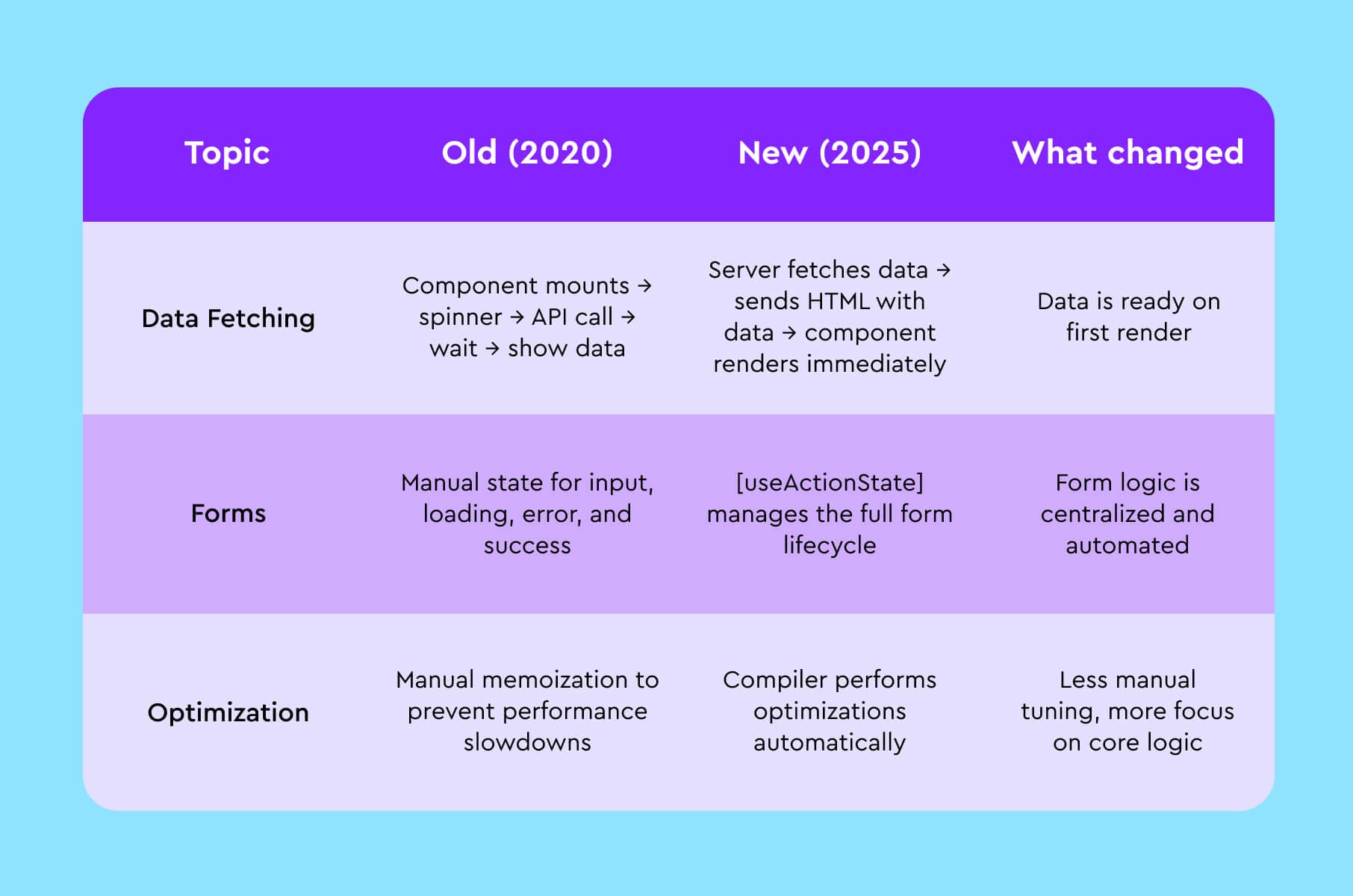
This is why we say React 19 changed front-end again. It removed the friction.
What business owners need to ask their tech team
If you are about to start a project or upgrade an existing one, do not just accept "we are using React." Ask deeper questions to ensure you are getting the benefits of the modern ecosystem.
Ask these three questions:
- Are we using React Server Components to reduce the bundle size?
- How are we leveraging the new Compiler to save on optimization time?
- Is our architecture set up for streaming to improve perceived performance?
If you need a team that already knows the answers, check out our work with React and Storybook. We focus on building scalable, future-proof design systems.
The bottom line
What is React today? It is the industrial-grade standard for web development. It has matured from a library for building "views" into a comprehensive architecture for building businesses.
The updates in React 19 (specifically the Compiler, Server Components, and Actions) mean that applications are faster to build and faster to use. For a Fintech startup, this means better real-time data handling. For an Edtech company, it means smoother interactive lessons.
We believe that understanding what is React.js at this high level helps you make better decisions. You do not need to write the code, but knowing the capabilities of the technology prevents you from underestimating what is possible.
FAQ – short answers to common founder questions
Q: So, in one sentence, what is React js again?
A: It is a React js library for building UI components that now includes first-class support for server rendering, async actions, and SEO metadata, making it suitable for serious SaaS, fintech, and platform products.
Q: What is React JavaScript compared with other front-end tools?
A: It is a JavaScript-based view system that focuses on the UI layer, while tools like Next.js, Remix, or Astro wrap React in routing, data loading, and deployment conventions.
Q: How does React js work with our existing TypeScript and testing setup?
A: React 19 works with both JavaScript and TypeScript and plays well with modern testing tools. Many of the testing concepts Merge covers in frontend testing frameworks: everything you need to know still apply directly.
Q: Does React use JavaScript only, or can we mix languages?
A: React runs in JavaScript engines in the browser and on the server. You can compile TypeScript or other languages down to JavaScript, yet at runtime React always works through JavaScript.
Q: From a business view, what does React.js do for us?
A: It gives your team a stable way to express screens and flows as components, share them across products, and keep performance and SEO at a predictable level using the features introduced in React 18 and 19.